General
3 TOP-LEVEL ITEMSWorkstations
Greenhouse
| ID | croparia:greenhouse |
| Category | Croparia |
| Max Stack Size | 64 |
Provides light level 8, opens a 3x3 inventory when right-clicked, and can interact with storage systems.
The Greenhouse should be placed above single-block crops. After it detects a block update, it performs one automatic harvest. Each harvest automatically consumes 1 seed. Harvested items are stored in the Greenhouse inventory.
It can also harvest vine crops such as pumpkins and melons automatically, but those crops still need one adjacent block of free growth space.
Recipe

Infusor
| ID | croparia:infusor |
| Category | Croparia |
| Max Stack Size | 64 |
| Min Excavation Tool |
A workstation that crafts items by applying an element to the item placed on top of it.
Right-click an empty Infusor with any Elemental Potion to infuse it. Right-click an infused Infusor with an empty bottle to extract the element again. A dispenser facing the Infusor can also perform those interactions when activated.
Right-click the Infusor with an item in hand to place one item on it. If the Infusor is weakly powered, it will place a full stack instead. A dropper facing the Infusor can also place one item onto it when triggered.
When crafting is triggered, the Infusor tries to insert the result into the player who provided the item, then into the container block below it. If neither target is available, it spawns the result as a dropped item above itself.
Recipe
Usage
Use an Elemental Potion on the Infusor to infuse it, then drop an item onto it to trigger the recipe.
You can inspect recipes in your recipe viewer. For example:


Debug
While sneaking, use the Recipe Wizard on the Infusor to cycle its infused element state.
Elemental Stone
| ID | croparia:elemental_stone |
| Category | Croparia |
| Max Stack Size | 64 |
| Min Excavation Tool |
A craftable decorative block. It can be combined with the Infusor to perform Elemental Soak.
Recipe
Usage (Elemental Soak)
Place an Infusor above the Elemental Stone and infuse it with an element. Elemental Soak then affects blocks in the 3 x 3 area on the same horizontal layer centered on the Elemental Stone.
You can inspect recipes in your recipe viewer. For example:

Debug
While sneaking, use the Recipe Wizard on the Elemental Stone to spawn an Infusor above it.
Crop Transmuter
| ID | croparia:crop_transmuter |
| Category | Croparia |
| Max Stack Size | 64 |
| Min Excavation Tool |
The Crop Transmuter converts crop fruits into specific material items. It has block-entity storage and opens its GUI when right-clicked.
Recipe
Usage
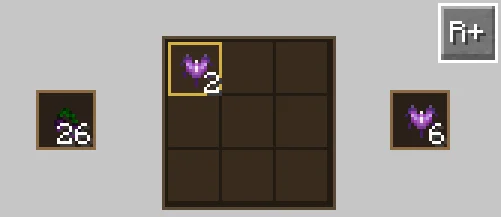
Right-click to open the GUI. Put crop fruit into the left slot, choose the desired output material in the middle, and collect the result from the right output slot. Conversion speed is one operation per game tick.
The R+ indicator in the top-right means it only works when powered by redstone. Clicking it switches the mode to only work when not powered (R-).
Ritual Stand
| ID | croparia:ritual_stand |
| Category | Croparia |
| Tags | #croparia:ritual_stands |
| Max Stack Size | 64 |
| Min Excavation Tool |
| ID | croparia:ritual_stand_2 |
| Category | Croparia |
| Tags | #croparia:ritual_stands_2#croparia:ritual_stands |
| Max Stack Size | 64 |
| Min Excavation Tool |
| ID | croparia:ritual_stand_3 |
| Category | Croparia |
| Tags | #croparia:ritual_stands_3#croparia:ritual_stands#croparia:ritual_stands_2 |
| Max Stack Size | 64 |
| Min Excavation Tool |
The Ritual Stand is the core block of Rituals. After building a ritual structure, placing the correct input blocks, and dropping the input item onto the stand, you trigger a ritual. Rituals can craft new items, enchant existing ones, or summon mobs.
Right-click the Ritual Stand with an item in hand to place one item on it. If the stand is weakly powered, it places a full stack instead. A dropper facing the stand can also place one item onto it when triggered.
Recipe
Usage
First, build the ritual structure that matches the Ritual Stand tier. Higher-tier ritual structures can also be used for lower-tier rituals. You can inspect them in your recipe viewer:
In the structure preview above, the Input Block label marks the positions where ritual input blocks must be placed. Once the correct blocks are in place and the input item is dropped onto the Ritual Stand, the ritual is triggered.
If the result is an Enchanted Book, the ritual applies enchantments to the input item. The book’s enchantments and levels indicate the available enchantments and their maximum levels, while the book count indicates how many levels are added per ritual.
If the result is a Spawn Egg, the ritual summons the corresponding mob.
Debug
While sneaking, use the Recipe Wizard on the Ritual Stand to generate the corresponding ritual structure centered on it.